Characteristics of Object Storage #
Lance is a columnar storage format that primarily targets S3 object storage. Compared with local disk storage, object storage has the following characteristics:
| Constraint | Consequence |
|---|---|
| There are no real directories | Directories are just key prefixes; tree/ and _indices/{uuid}/ are naming conventions |
| No transactions across objects | You cannot “write multiple files at once and have them take effect atomically” |
| Only single-object operations are atomic | PUT / PUT-if-not-exists / DELETE |
| rename is not always atomic | On S3 it is copy+delete, so rename cannot be used for commit |
| list can be expensive | Every directory listing is a request; on S3 Express it is even O(n) |
| Requests are rate-limited | File names need to be spread across prefixes |
| Consistency models differ | You cannot assume “it shows up in list immediately after writing” |
Therefore, any design that “modifies multiple files together” is infeasible.
These characteristics of object storage cause the file organization design to differ greatly from designs targeting local disks. In local-disk-oriented file designs, a file can be modified in place — a disk structure such as a B-Tree, for example, can modify a data file page by page, and such a modification can target a specified range within a specified file. But in object storage, since a modified file has to be uploaded to object storage in full, even changing a single byte has the same effect as modifying the whole file and uploading it again.
Given these characteristics, file organizations targeting object storage generally have the following properties:
- There is a metadata file in the system that records which files make up the current version.
- Committed files are never modified.
- If the data changes, the change is achieved by writing new files and modifying the metadata file to point at the new files.
Based on the analysis above, we now understand the characteristics of object storage and how the corresponding file organization should be designed. Next, let’s look at Lance’s file organization.
Lance’s File Organization #
Although Lance, like Parquet, is a columnar storage format, Parquet only has columnar data files, whereas Lance has a more complete file organization, including:
- The dataset metadata file (manifest)
- Data files (equivalent to Parquet data files)
- Index files
- Transaction files
- Metadata files that support tags and branches
With these categories of files, Lance can implement MVCC, indices, and other features by itself. If only Parquet were used, the application layer would need to design these file organizations itself to implement such features — for example, databend.
The following is a tree diagram of Lance’s file organization:
{dataset_root}/
├─ data/
│  ├─ {data_file_key}.lance              ← data file (column data + page encoding)
│  └─ {data_file_key}/                   ← Blob v2 sidecar (optional)
│     ├─ 00000000000000000000000000000001.blob
│     └─ ...
├─ _versions/
│  ├─ {bit-reversed version}.manifest    ← or {version}.manifest (V1)
│  └─ latest_version_hint.json           ← optional
├─ _transactions/
│  └─ {read_version}-{uuid}.txn
├─ _deletions/
│  ├─ {fragment_id}-{read_version}-{id}.arrow
│  └─ {fragment_id}-{read_version}-{id}.bin
├─ _indices/
│  └─ {index_uuid}/
│     └─ ...                             ← index implementation-defined
├─ _refs/
│  ├─ tags/{tag}.json
│  └─ branches/{branch}.json
└─ tree/{branch_name}/                   ← branch dataset, same structure as above
In this file organization, there are the following categories of files:
- Manifest files: the metadata files describing the whole system, and the key to implementing MVCC
- Data files: the files that actually store data
- Transaction files: used to decide whether the transactions on both sides can coexist when a commit conflicts
- Index files: store indices of various types
- Tag and branch files: metadata files that store tags and branches
The following sections explain each in detail.
Manifest Files #
The _versions/ directory holds Manifest files. A Manifest is the metadata file of the whole system, and it is a complete snapshot of a certain version:
version
schema
fragments
indices
config
table_metadata
base_paths
feature flags
transaction_file / transaction_section
With this information, a read only needs to read the Manifest file to obtain the overall organization of the whole system. Correspondingly, when modifying, the Manifest file is the last file to be modified: only after data files, transaction files, and so on have all been modified is the Manifest file finally updated.
latest_version_hint.json #
In addition to *.manifest, the _versions/ directory may also contain a latest_version_hint.json, whose content is:
{"version": 42}
It solves only one problem: how to cheaply find the latest manifest. But not all storage needs it:
| Storage | Way to find the latest version | Needs hint |
|---|---|---|
| S3 Standard / GCS / Azure | V2 naming is bit-reversed, so the first item from list is the latest |
No |
| S3 Express / local filesystem | list is not guaranteed to be lexically ordered; a full list is O(n) |
Yes |
In other words:
uses_version_hint = global switch && !list_is_lexically_ordered
On storage that needs it, the reader first reads the hint to get a starting version, then probes upward with HEAD requests until some version does not exist; if the hint is missing or stale, it falls back to a full listing. It is purely an optimization: deleting it does not affect correctness, and write failures can be ignored.
Returning to the Manifest file, we will focus on explaining its version and fragments fields.
version #
In Lance, version is a monotonically increasing positive integer. There is no pointer between different versions pointing to the previous version’s Manifest file. In other words, different versions use version as logical time to distinguish their ordering, rather than using pointers.
A direct consequence: any version can be opened in O(1), and time travel does not require replaying history; conversely, deleting an old manifest does not affect the usability of new manifests.
fragments #
Next, a fragment is a logical concept. It consists of a group of data files and is the smallest “row unit” in the Manifest file, used to represent an immutable data shard of a Lance table. In other words: one fragment may correspond to multiple data files, while a data file can belong to only one fragment within the same manifest — the relationship is one-to-many.
The qualifier “within the same manifest” is needed because across versions the same data file can be referenced by multiple manifests:
v1.manifest → fragment 0 → data/A.lance
v2.manifest → fragment 0 → data/A.lance
v3.manifest → fragment 0 → data/A.lance
This is exactly the cost of “files are immutable + the manifest is a complete snapshot”: every data change requires writing a new manifest, while old manifests still point at the old files. Precisely because of this, reclaiming space cannot be decided by “delete it once some manifest no longer references it”; it must be judged by the union of references from all retained version manifests.
A fragment may correspond to multiple data files, which makes it easy to achieve the following: when part of the data in a fragment is modified, only some of its data files are modified.
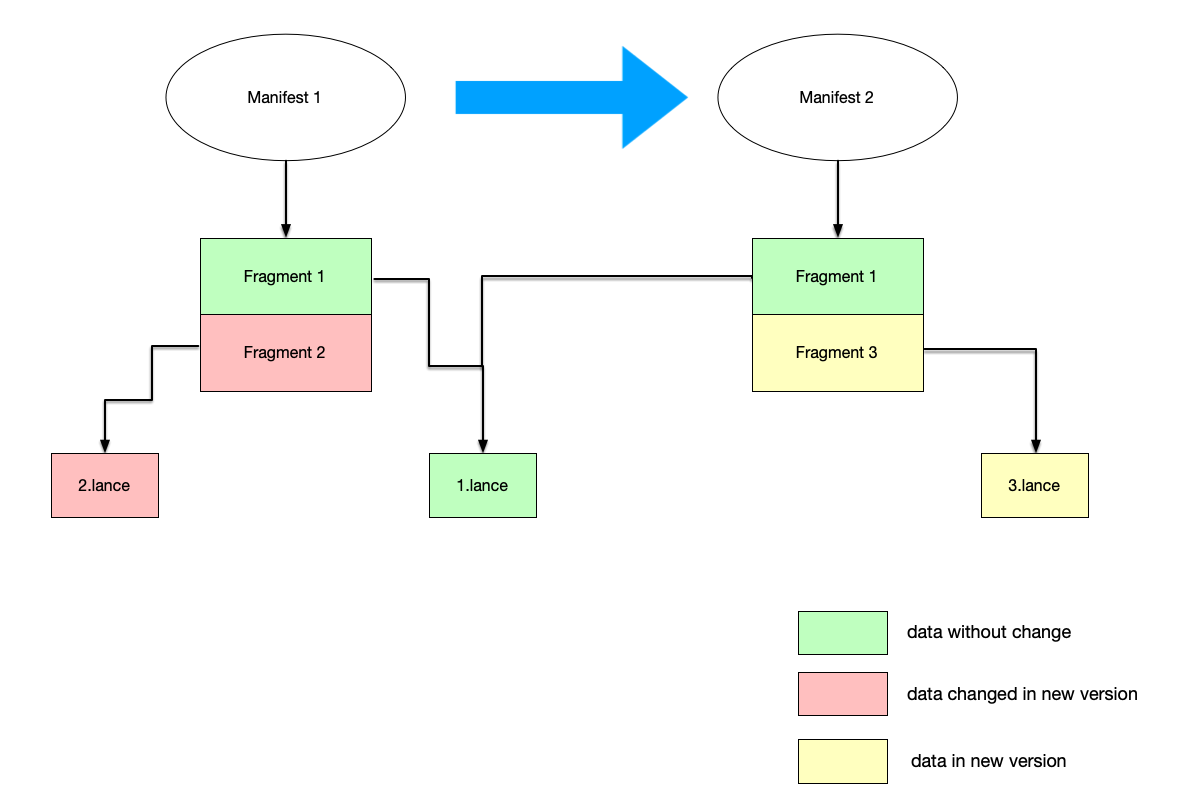
As shown in the figure:
- Manifest 1 contains two fragments, one with data file
1.lanceand the other with data file2.lance. - After a certain modification, the Manifest file is updated to Manifest 2, in which:
- fragment 1 was not modified, so it can continue to be used by Manifest 2, and
1.lanceis kept as is. - The data in
2.lancewas modified; following the principle we mentioned earlier that “files cannot be modified after being written”, the change is not made to2.lancebut instead a new3.lancefile is generated and pointed to by a new fragment 3.
- fragment 1 was not modified, so it can continue to be used by Manifest 2, and
Note that here “the old fragment 2 disappears and the new fragment 3 appears”, rather than updating fragment 2 in place. Lance’s fragment ids are a global high-water mark and are never reused: if an id were reused, deletion files, row addresses, and caches left over from old versions would incorrectly point at new data.
Data Files and Deletion Files #
We explain data files and deletion files together here because, in my view, both belong to the category of files that store data.
First, the data files in the data directory fall into two categories overall:
.lancefiles: store the actual column data; the format of data files will be explained in detail in a later chapter..blobfiles: if a blob value is especially large, it is not stored in the.lancefile but stored separately in a.blobfile.
Besides the data files in the data directory, the _deletions directory also stores deletion files. This is likewise an application of the principle that “files cannot be modified after being written”. Consider this scenario: some data in the original data has been deleted. Rewriting a new data file would be too expensive; instead, the ids of the data to be deleted are written into a separate deletion file.
Deletion files are named as follows:
_deletions/{fragment_id}-{read_version}-{id}.{arrow|bin}
| Extension | Format | Applicable to |
|---|---|---|
.arrow |
Arrow IPC, list of row numbers | Sparse deletions |
.bin |
Roaring bitmap | Dense deletions |
Including fragment_id and read_version in the filename both guarantees uniqueness and allows old version manifests to continue referencing old deletion files.
Therefore, the Fragment struct has two members that store the fragment’s data files and deletion file respectively:
pub struct Fragment {
    pub files: Vec<DataFile>,
    pub deletion_file: Option<DeletionFile>,
    // ....
}
For example, a fragment’s original data file contains three rows of data ["hello", "string", "world"], and a certain update deletes the second row. In this case there is no need to regenerate a data file ["hello", "world"]; instead, only a new deletion file needs to be added to record that the second row is deleted, and when reading and writing, the deleted row is automatically filtered out.
Transaction Files #
The _transactions directory stores transaction files, named {read_version}-{uuid}.txn. The file content is the raw encoding of the lance.table.Transaction protobuf, with no header, footer, or length prefix.
It records “intent” rather than “result”:
read_version
uuid
operation (Append / Delete / Overwrite / Update / Rewrite / ...)
  └─ parameters required by each
For example, Append only knows “these fragments are to be added”, not their final fragment ids; the final ids, the manifest version number, and the index coverage range are all computed when the manifest is built.
It is used at commit time for:
- Letting the loser know what the winner did when retrying
- Conflict detection
- History auditing
The details of transactions will also be analyzed in a later chapter.
Index Files #
The _indices directory stores index files, with one UUID directory per index segment:
_indices/{uuid}/
This UUID is the IndexMetadata.uuid generated when the index is written, not the index name. An index with the same name may correspond to multiple physical segments; replacement, pruning, and remapping all happen at the segment level, while the directory name stays unchanged.
The directory contents are determined by the index type:
IVF-PQ         → centroid / PQ codebook / partition data
BTREE          → sorted pages + page index
FTS / inverted → posting list / document table
bitmap         → Roaring bitmap
zonemap        → statistics
FRAG_REUSE     → fragment reuse mapping
MEM_WAL        → MemWAL state
Like data files, index files may also be referenced by multiple version manifests.
Tag and Branch Metadata _refs/
#
_refs is located in the main root, is shared by all branches, and stores two kinds of named references.
Tags and Branches respectively solve the following problems:
Tag    = give a certain (branch, version) a name
         solving "how to point stably at a snapshot"

Branch = fork another version chain from a certain version
         solving "how to evolve independently without affecting each other"
In short: Tag solves the naming problem, while Branch solves the forking problem.
Tag #
Tag files are stored in _refs/tags/{tag}.json, with roughly the following content:
{
  "branch": null,
  "version": 5,
  "createdAt": "...",
  "updatedAt": "...",
  "manifestSize": 1024,
  "metadata": {}
}
branch being null means main, so a tag always points at the pair (branch, version) rather than a bare version number.
Using a name instead of a version number
The platform side should not hardcode version=42:
ds = lance.dataset(uri, version=42)               # fragile
ds = lance.dataset(uri, version="prod-2026-11")   # readable, changeable
Giving “important versions” a stable anchor
Training dataset snapshot  → tag "training-v1"
Production release point   → tag "prod"
Evaluation baseline        → tag "baseline-2026-11"
Preventing deletion by GC
The version a tag points to enters the cleanup working set by default
As long as the tag exists, this version will not be reclaimed
This is the only “side-effect” capability of a tag: it is a handle for a retention policy.
Allowing names to move
prod: v5 → v7
Only tags.update("prod", 7) is needed, without changing any data.
This differs from Git: Git tags are immutable by default, while Lance tags are re-pointable aliases.
What Tag does not solve:
✗ Does not isolate writes: you cannot "modify data on prod without affecting others"
✗ Does not create a new version
✗ Does not copy data
✗ Does not provide parallel development
Branch #
Branch files are stored in _refs/branches/{branch}.json; in addition, tree/{branch}/ holds the data files of a branch, and the layout of this directory is the same as that of a regular dataset (data/, _versions/, _indices/ are all present).
An easy pitfall: a / in a branch name is encoded differently in two places.
branch = "bugfix/issue-123"

_refs/branches/bugfix%2Fissue-123.json   ← metadata file, slash is encoded
tree/bugfix/issue-123/                    ← data directory, truly nested
The former must be flat (otherwise it would be treated as a subdirectory), while the latter is intentionally hierarchical (to make prefix-based cleanup easy).
Branch can create branches, thereby achieving parallel evolution without interference.
main        → production data
tree/exp-a  → experimenter A's cleaning logic
tree/exp-b  → experimenter B's schema change
The three chains each have their own _versions/, their own data/, and their own _indices/.
Note that branch version numbers are counted independently:
main v5 → create_branch("dev", 5) → dev v5
Here dev v5 and main v5 are two completely different manifests that just happen to have the same version number (inherited at fork time). This is also why a tag must carry a branch.
Isolation without copying data
Creating a branch is a shallow clone:
manifest.base_paths → parent branch
data_file.base_id   → parent branch
So:
1 TB main
create_branch("exp") writes only one manifest + one JSON
Compared with deep_clone, which really copies all files.
Supports “discard after trial and error”
create branch → write → find a problem → delete_branch
main was never touched
Supports “forking from any point”
ds.create_branch("fix", 12)           # from the current branch's v12
ds.create_branch("exp", "v2-prod")    # from a tag
ds.create_branch("child", ("dev", 7)) # from another branch's v7
Naturally suited to “multi-tenant / multi-environment”
tree/{branch_name}/ stores the branch’s data files, with the same structure as top-level data files:
tree/tenant-a
tree/tenant-b
tree/staging
tree/prod
Each is a complete dataset that can be read and written independently.
What Branch does not solve:
✗ Does not provide named snapshots: a branch points at "latest", not a fixed version
✗ Does not auto-merge: Lance has no merge/rebase semantics for branches
✗ Does not share version numbers: each counts independently starting from the fork version
✗ Is not zero-cost: new writes still consume space
To summarize:
Tag    → naming and retention
         turning "a certain version" into a readable, movable, protectable name

Branch → forking and isolation
         using zero-copy shallow references to open a version chain that can evolve independently

Tag governs "where to point", Branch governs "where to write".
Summary #
Stringing these files together by “who decides whom”, the relationships are:
                    _versions/*.manifest
                    (single source of truth, complete snapshot, commit point)
                             │
        ┌────────────────────┼────────────────────┐
        │ fragments[]        │ index_section      │ transaction_file
        ▼                    ▼                    ▼
  data/*.lance         _indices/{uuid}/     _transactions/*.txn
  data/{key}/*.blob                         (or an inline copy in the manifest)
        │
        │ fragment.deletion_file
        ▼
  _deletions/*
The corresponding write order is:
1. Write data files / blob sidecar
2. Write deletion files
3. Write index files
4. Write _transactions/*.txn
5. Conditionally write _versions/*.manifest   ← only now are the first four steps visible to readers
And two conclusions that run through the whole article:
- The manifest is the single source of truth: readers only need the manifest, not transaction files;
- Files are immutable and shareable: a data file / index file may be referenced by multiple version manifests at the same time, so “deleting the old manifest” does not mean “deleting the files it references”.